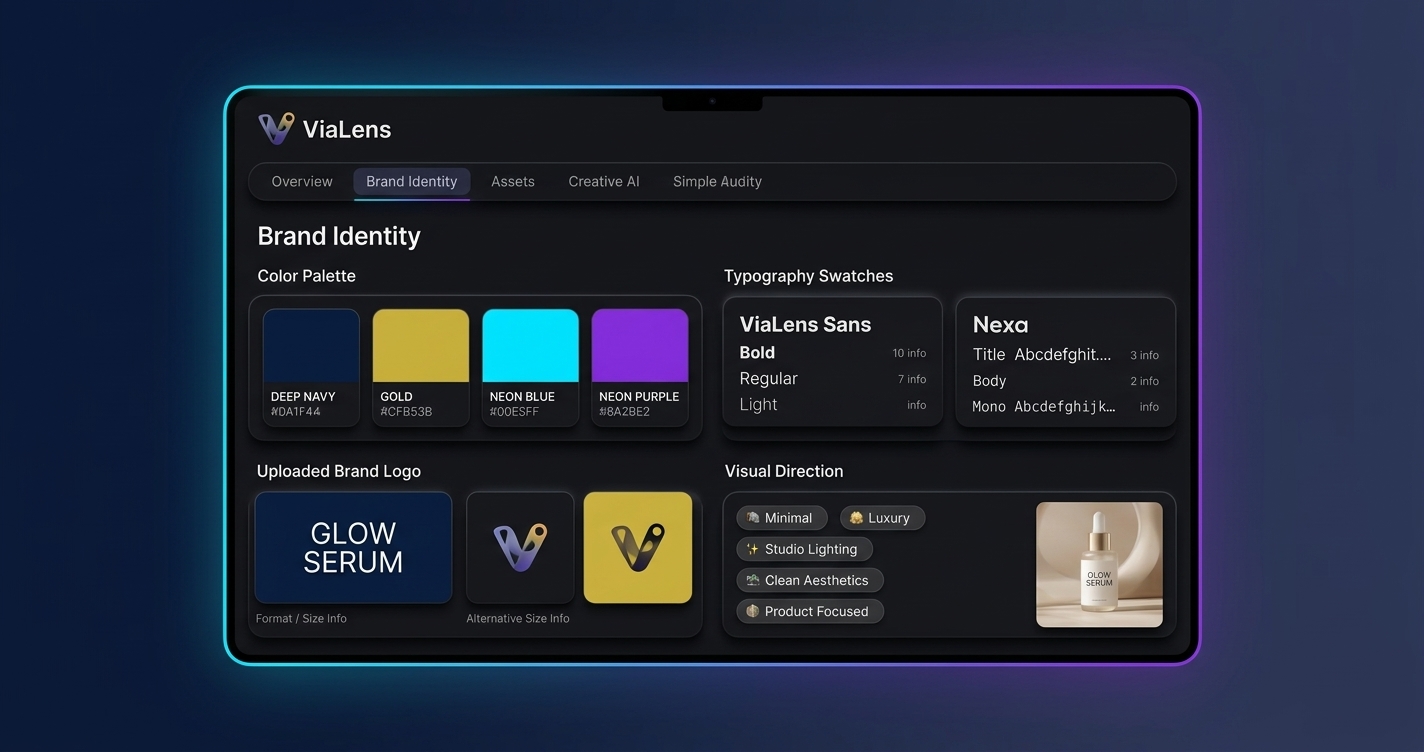
When businesses create marketing content across multiple tools, maintaining a consistent visual identity can become difficult. Different colors, typography, logos, and visual styles can make campaigns feel disconnected from one another.
ViaLens Brand Kit helps centralize important brand elements so you can use a consistent creative direction when producing supported AI marketing content.
What is the ViaLens Brand Kit?
The Brand Kit is a centralized place for your brand's key visual identity elements. Instead of repeatedly describing your brand style from scratch, you can keep important brand information organized in one place.
Why Brand Consistency Matters
A consistent visual identity helps customers recognize your business across different marketing touchpoints. Whether you are creating a product image, social creative, or advertising campaign, maintaining a recognizable visual language makes your content feel more connected and professional.
What to Include in Your Brand Kit
- Brand Logo: Add your primary logo so it can be referenced where supported.
- Brand Colors: Define your primary and secondary colors to establish your visual palette.
- Typography: Add your preferred typography or font direction where supported.
- Visual Style: Describe the overall look and feel that represents your brand.
- Brand Direction: Include useful information about imagery, mood, and visual language.
Step-by-Step: How to Set Up Your Brand Kit
Step 1: Open Your Brand Kit
From your ViaLens dashboard, open the Brand Kit section and gather your current logo files, brand colors, typography preferences, and existing brand guidelines.
Step 2: Add Your Brand Identity
Enter your official brand colors and logo rather than temporary campaign elements. This gives your Brand Kit a reliable foundation for future campaigns.
Step 3: Define Your Visual Style
Describe the visual direction you want your AI-generated content to follow. For example, a luxury cosmetics brand might define its style as: "Minimal, premium, elegant, soft studio lighting, refined compositions, clean backgrounds, sophisticated luxury aesthetic."
Step 4: Use Your Brand Kit in Creative Workflows
Once configured, use your Brand Kit across supported marketing tools in ViaLens to guide generated visuals and reduce repetitive prompt configuration.
Brand Kit + AI Image Generation
When creating product visuals with Image Studio or Product Photoshoot, your brand colors and visual direction help guide the overall creative style automatically across product collections.
Best Practices for Your Brand Kit
- Keep your brand information accurate: Use official logos, hex colors, and visual guidelines.
- Be specific about visual style: Clear descriptions produce better AI outputs than vague terms.
- Avoid temporary campaign directions: Keep the main Brand Kit focused on your core identity.
- Update your Brand Kit when your identity changes: Reflect any brand updates immediately in ViaLens.
Build Your Brand Foundation with ViaLens
Set up your ViaLens Brand Kit once, keep it updated, and use it as the foundation for every AI-powered marketing creative you produce.

التعليقات (0)
كن أول من يترك تعليقًا.