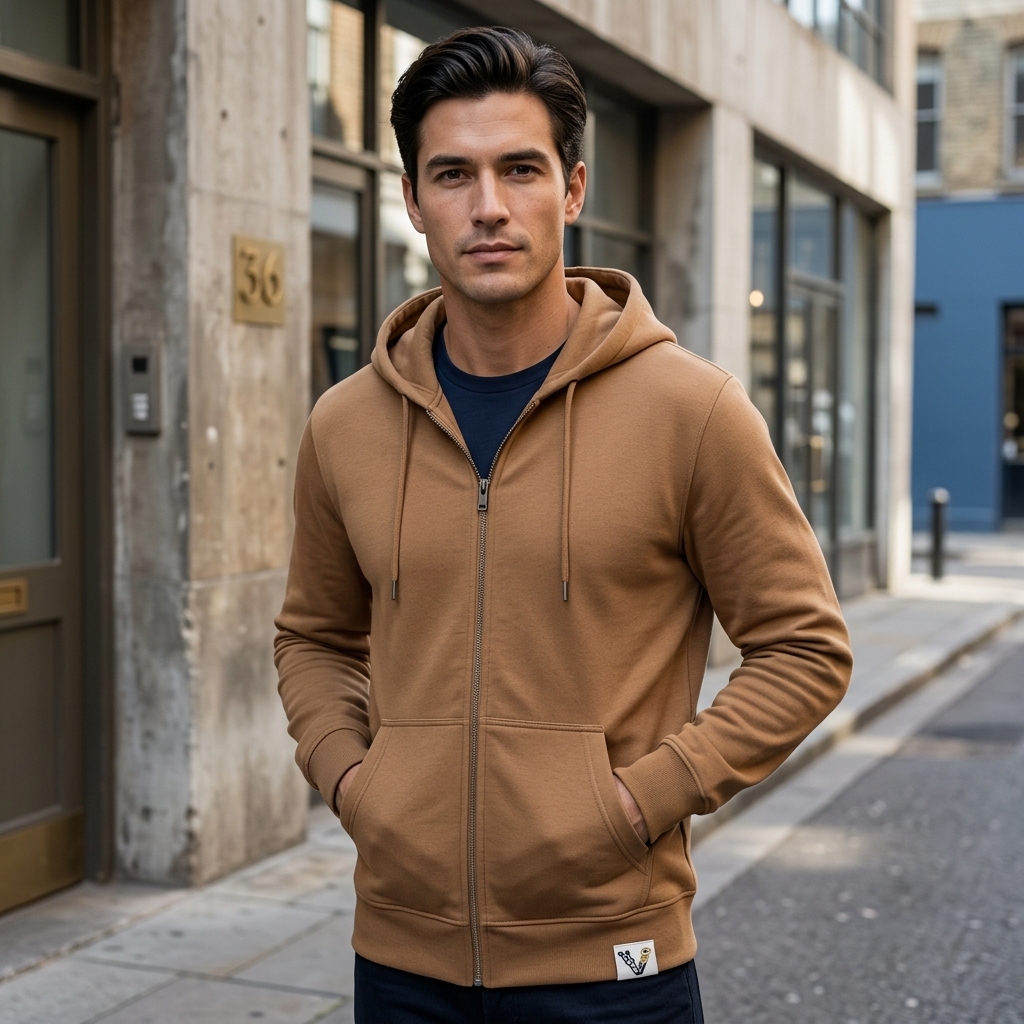
In the fast-paced fashion and e-commerce industry, high-quality visual storytelling plays an important role in how customers discover and evaluate apparel. Standard garment packshots on plain backgrounds show the product clearly, but editorial lifestyle imagery can create a stronger visual connection and communicate the brand's style.
Traditionally, launching a seasonal apparel collection required professional models, photography studios or outdoor locations, styling teams, and extensive post-production. With ViaLens Fashion Studio, fashion brands and e-commerce stores can create model-based fashion visuals and lookbook concepts directly from their browser.
What is ViaLens Fashion Studio?
ViaLens Fashion Studio is an AI-powered fashion visualization workspace designed for clothing brands, fashion designers, e-commerce stores, and digital marketers. By uploading garment images such as flat-lay or hanger shots, you can visualize clothing on AI-generated models and create fashion scenes with different poses, environments, lighting styles, and creative directions.
Key Capabilities:
- Intelligent Garment Fitting: Visualize garments such as t-shirts, hoodies, blazers, dresses, and other apparel on AI-generated fashion models.
- Virtual Try-On & Model Variations: Explore different model appearances, body types, poses, and styling concepts without arranging a new physical photoshoot for every variation.
- Dynamic Setting & Atmosphere: Place fashion models in different environments, from modern urban locations and architectural spaces to clean studio settings.
- Wardrobe Management: Save and organize garment assets in your digital wardrobe so they can be reused for future fashion concepts and photoshoots.
Step-by-Step: How to Create an Editorial Fashion Shot
Step 1: Upload Your Garment to Wardrobe
Navigate to Fashion Studio in the ViaLens dashboard and click + New Photoshoot. Upload a clean, high-resolution image of your garment.
Pro Tip: Flat-lay and hanger shots with a clean background generally provide a clear reference for the garment and its important visual details.
Step 2: Select Your Garment & Model
Select your garment from 01 Clothes. You can then choose an available AI model or define the desired model and visual direction for your fashion concept.
Consider the target audience, garment style, campaign aesthetic, and intended market when selecting the model and overall look.
Step 3: Define Creative Direction & Lighting
Set your visual direction under Creative Direction and define the atmosphere you want for the final image.
- Lighting: Choose options such as
Soft CinematicorDaylightfor different fashion photography aesthetics. - Extra Notes: Add additional creative instructions describing the model, environment, pose, styling, composition, and overall fashion direction.
For example: "A stylish male model wearing the hoodie, modern urban street background, natural daylight, editorial fashion photography style."
Step 4: Choose Aspect Ratio & Render
Select the format that best matches your intended use, such as 9:16 for Instagram Stories and Reels, 1:1 for square social content, or 3:4 for fashion catalogs and product-focused layouts.
Once your garment, model, creative direction, and format are configured, click Generate to create your fashion visual.
Real-World ROI & Efficiency
| Metric | Traditional Fashion Shoot | ViaLens Fashion Studio |
|---|---|---|
| Production Cost | Models, photographers, studios, styling, and production | AI-powered creative production using credits |
| Turnaround Time | Requires scheduling, shooting, and post-production | Generate fashion concepts directly from your browser |
| Location & Casting | Dependent on physical locations and available models | Explore different models, environments, and visual styles digitally |
| Creative Variations | New combinations may require additional production | Create multiple fashion concepts from your garment assets |
Bring Your Apparel Collections to Life Today
Whether you are showcasing urban streetwear, luxury tailoring, casual fashion, or seasonal collections, ViaLens Fashion Studio gives you a faster way to create professional fashion visuals directly inside your browser.
Transform garment assets into lifestyle imagery, experiment with different models and environments, and build a stronger visual library for your apparel marketing campaigns.
التعليقات (0)
كن أول من يترك تعليقًا.